

Huawei P9 Lite Remove Google Account
In this tutorial we explain how to reset and restore factory settings to Huawei P9 Low-cal, the phone volition remain as the first day information technology is purchased, without any information or app installed.
If you lot take forgotten the device security code or the lock blueprint, if y'all want to sell or recover your device to another person, or if your mobile is very tedious, has a virus, or is very loaded with information, it commonly be the most common reasons for a consummate reset.
Attention: With this procedure you will lose absolutely all the information, contacts, notes, photos, videos, applications; so we recommend that it be necessary, make a previous backup; The data on the microSD memory card is the but thing that will not be deleted.
How to reset a Huawei P9 Lite to factory settings
1. You must plow off your mobile phone.
two. At present you lot must press and hold the volume up and power keys at the aforementioned time until you have the Huawei logo.
3. Choose SELECT FACTORY CLEANING / RESET DATA with the Volume UP / Down keys (1) and press the OFF / ON key to confirm.
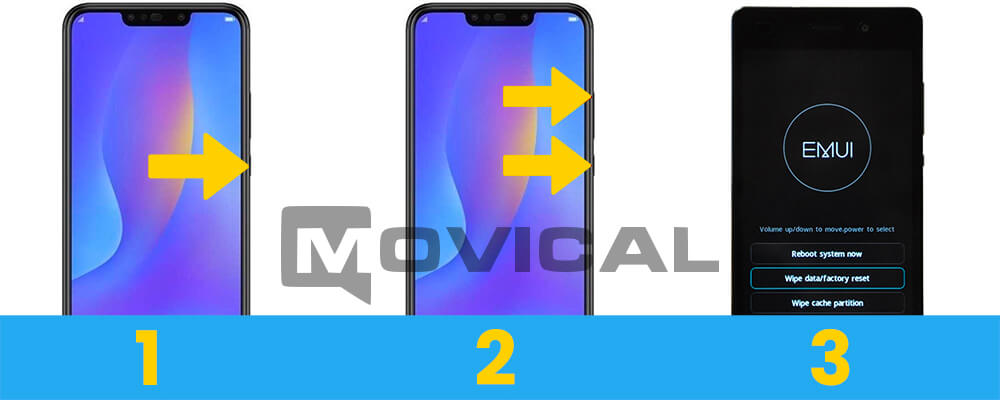
iv. The device will be formatted in a few seconds.
5. Done! Information technology is very piece of cake to restore the factory settings on P9 Lite.
FRP bypass Huawei P9 Lite (remove Google account) with Huawei Reset Cardinal
Unfortunately this key calculator to reset the Google account is non a Costless service, if you are interested y'all can buy this service at the top of the spider web.
We remind y'all that this service helps you to reset your google account with FRP bypass from any Huawei, y'all just demand a USB cable and a reset key that is generated using the mobile IMEI.
Requirements
1. USB data cable
2. Download, unzip and install the Huawei Reset Central
three. Download, unzip and install the drivers
Tutorial to remove Google business relationship with Huawei Reset Key
ane. Buy in the class above past filling in the IMEI of the Huawei.
2. When the Central is calculated we volition send the perfectly detailed instructions to your email.
3. It would simply be, having the phone turned off./p>
iv. With the telephone turn off, press and hold Volume downwardly and Power keys, while holding the keys connect the USB cable.
4b. (For any models it is not necessary to press the Power, endeavour both ways).
five. Run the software FRP&SecureBootUnlockTool.
6. Now, paste the RESET Cardinal sent by email.
7. Finally, printing the FRP Unlock push button, the programme volition remove the Google account in a few seconds.
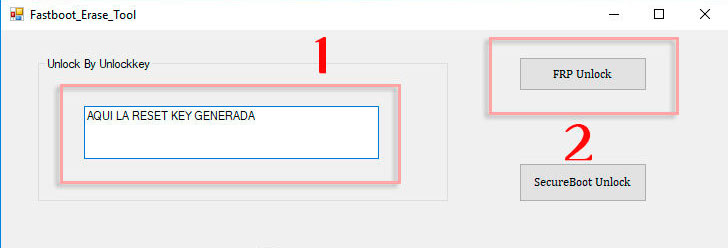
Source: https://www.movical.net/us-en/reset/huawei/p9-lite
Posted by: shroyerplasoner.blogspot.com
0 Response to "Huawei P9 Lite Remove Google Account"
Post a Comment